We had a beautiful weeks vacation, staying at Llawnroc, in Widemouth Bay.
The bay is stunning, with sandy beaches, cliffs and rock pools, a child's heaven. The surfing is good too, with a surf school at each end of the beach, although this late in the season, the one our end was shut.
There is a cafe next door to the complex, providing hot and cold drinks, sandwiches and ice cream, this is open every day until the half term holidays, then only weekends; you can even buy a bucket and spade.
We have a Jack Russell, and she loved the beach, so many things to sniff, lots of other dogs to play with, it is defiantly a dog friendly beach, plus there are coastal walks in both directions, by the end of the day the mutt should be knackered.
If you are a fisherman, again you have the sport here, straight on the beach, I found the best time was low tide, using mackerel. You can also go to the breakwater in Bude where there is also good fishing, although I was quite happy just to grab my rod and a bucket, then meander down to the beach for a couple of hours every day.
Now for the house, it is simply stunning, two double bedrooms, one twin and a bunk bed room that sleeps four, the house sleeps a total of ten, each room has it's own en suite shower/toilet and there is an extra loo under the stairs. Three of the bedrooms are on the ground floor, with the bunk bed room, kitchen/diner and lounge area upstairs where the views are best. Everything has been well thought out about the house, the showers were massive, not poky little things stuffed in as an afterthought, there were two iPod docks, one on the amp and one on the wall, speakers were set into the ceiling, it was all very 'modern'. The only drawback, was the access to the rear garden was via one of the bedrooms, but I could live with that. If you want more information about the house visit Elite West Holidays.
It was great having my family around me, it is not often that we all come together and I really cherish these moments. The thing that kept us sane was the WiFi (phone coverage was rubbish), the Sky (in most of the bedrooms as well as the lounge) and the XBox, gone are the days when you sit round the table and play board games, interactive is the way to go.
I was also impressed by the management company, we had a really bad storm one day and that knocked out the Sky, I made a call, left a message on the answer phone, and it was repaired the next day.
Lynne loved the kitchen, the only thing missing was a whisk, easily resolved with our first trip to Morrisons in Bude, so we didn't eat out at all, preferring to site down as a family and chat, James and Serena cooked a Superb Korma, Simon and Faye a great (I mean that in both ways) pasta bake with meatballs; it was really refreshing to be waited on by my kids.
This is our last night, we are off up to the Bay View Inn for us tea, we don't want to cook on the last night, no tidying up needed...
The Bay View Inn is packed, we managed to get the last table, would recommend reserving a table next time. Food was good, service a tad slow, probably because it was packed to the gunnels...
Friday, September 28, 2012
Wednesday, September 26, 2012
Fishing at Widemouth Bay
So my son, James, has taken up the sea fishing habit, living in Brixham it is the perfect place to take up this sport, and like any supporting father, I have had to have a go.
A week's holiday in Widemouth Bay, together with James, gave me the perfect opportunity to try out sea fishing (instead of the normal course fishing that I enjoy).
There seems to be a lot of science in this sport, you need to know the habits of the fish, understand tide tables, where the best place to cast is, what bait to use etc., local knowledge is a must, which is why it was quite fortunate that I got chatting with the attendant of the beach car park, he had a wealth of knowledge about fishing on this beach.
So, from the word of the 'expert', at high tide, this time of year (late September), there should be Bass about, and at low tide, the Skate make an appearance.
Suffice to say, that I have now fished this beach at high tide, low tide, with the tide coming in, with the tide going out; I have used ragworm (not recommended by said parking attendant), mackerel and sand eel; all to no avail, not even a bite although a couple of 'knocks' as they say in the trade.
My only assumption is, that there are no fish in Widemouth Bay at the end of September - fours days fishing and nothing to show for it apart from water logged wellies!
Addendum
There seems to be at least one fish in the bay, this bass, about 1.5lb, was caught at low tide after about an hour and a half in the cold wind. Five days, one fish; Lynne says "I am a crap hunter gatherer".
A week's holiday in Widemouth Bay, together with James, gave me the perfect opportunity to try out sea fishing (instead of the normal course fishing that I enjoy).
There seems to be a lot of science in this sport, you need to know the habits of the fish, understand tide tables, where the best place to cast is, what bait to use etc., local knowledge is a must, which is why it was quite fortunate that I got chatting with the attendant of the beach car park, he had a wealth of knowledge about fishing on this beach.
So, from the word of the 'expert', at high tide, this time of year (late September), there should be Bass about, and at low tide, the Skate make an appearance.
Suffice to say, that I have now fished this beach at high tide, low tide, with the tide coming in, with the tide going out; I have used ragworm (not recommended by said parking attendant), mackerel and sand eel; all to no avail, not even a bite although a couple of 'knocks' as they say in the trade.
My only assumption is, that there are no fish in Widemouth Bay at the end of September - fours days fishing and nothing to show for it apart from water logged wellies!
Addendum
There seems to be at least one fish in the bay, this bass, about 1.5lb, was caught at low tide after about an hour and a half in the cold wind. Five days, one fish; Lynne says "I am a crap hunter gatherer".
Sunday, August 19, 2012
Freelander Tailgate Window Repair
Got a MK1 or MK2 Freelander? Eventually the tailgate window mechanism will stop working and you are going to have to replace it. The reason for the failure is that it is a cabled system connected to a motor, the cables are steel, the holder clamps for the window glass are cast aluminium, over the years the aluminium oxidises, reacts with the steel cables and they rust through.
So this is how I repaired my Freelander.
The first job is to remove the trim from the tailgate, under the pocket section you will find 4-5 screws to remove and then you need to pull the trim away from the door, start at the bottom and work you way upwards, the trim then unclips from the top hooks.
You are then faced with the foam cover, unless you are buying a replacement, this needs to be carefully peeled away using a sharp blade, cutting through the mastic - the warmer the day the easier it is.
Now you will be able to see the 'gubins'.
You will see the two runners either side of the door, and where the glass clips in, there is a clamp bolt on each of the cast aluminium clams that needs to be loosened, there is also to electrical connections to the window that need to e disconnected. You should now be able to lift the glass free of the car.
Each runner is held using two nuts at the top and a nut at the bottom, just undo and you should be able to 'jiggle' the runner out of the door. The motor is held in with three bolts, just loosen them and twist the motor free of the door.
Once everything is out it should look like this.
I purchased a kit on eBay for the replacement cables, you can see by the video below (from the supplier) how easy they are to replace, don't believe the video! I had real problems getting the cables wound onto the reel, they were either too tight or too loose, I actually had to change the run slightly to get the tension correct.
The last job to do was to refit everything, but hold off sticking the foam back. With different cables in the system, the window will need adjustment using the clamps, this takes a bit of trial and error but after a few adjustments you should be level :)
Have fun.
So this is how I repaired my Freelander.
The first job is to remove the trim from the tailgate, under the pocket section you will find 4-5 screws to remove and then you need to pull the trim away from the door, start at the bottom and work you way upwards, the trim then unclips from the top hooks.
You are then faced with the foam cover, unless you are buying a replacement, this needs to be carefully peeled away using a sharp blade, cutting through the mastic - the warmer the day the easier it is.
Now you will be able to see the 'gubins'.
You will see the two runners either side of the door, and where the glass clips in, there is a clamp bolt on each of the cast aluminium clams that needs to be loosened, there is also to electrical connections to the window that need to e disconnected. You should now be able to lift the glass free of the car.
Each runner is held using two nuts at the top and a nut at the bottom, just undo and you should be able to 'jiggle' the runner out of the door. The motor is held in with three bolts, just loosen them and twist the motor free of the door.
Once everything is out it should look like this.
Taking the cover of the motor will probably show what a state the cabling can get into...
Have fun.
Thursday, July 19, 2012
Most Girls Steal Ashtrays
Caught one of the girls trying to steal an ice bucket full of sweets yesterday, the things you girls can get into a handbag....She was from Croydon....
Wednesday, May 2, 2012
Coins in your handbag?
Most women have coins rolling around in their handbag, but I found these Roman coins at the bottom of Lizzie's 'titchy' handbag today. I didn't believe I could find anything unusual in such a small bag, but it just goes to show...
Purse, check. Compact hairbrush, check. Assorted drugs, check. Roman coins....
Wednesday, April 25, 2012
Drought in Kirdford
There is supposed to be a drought in West Sussex, but today I think someone must have left the hosepipe running...
I was off to see my friend Derek at Sussex Autogas, to discuss the pending service and MOT of my Range Rover, going though the village, past the church, I came to these views.
Well I had a Range Rover didn't I? I should be able to have some fun and get through this. I drove through the first flood and stopped at the brow of the bridge, raised up the suspension to it's highest limit, put the car in drive and went for it.
Well I got half way through the second flood, the other side of the bridge and the Rangie spluttered to a halt and died. Oops! I was a little at a loss as the water was 6" up the doors, hmmm, there was no way I was going to open the door at this point, so I sat there and phoned Derek, his workshop was only 500 yards up the road, hopefully he would pop down with a winch and tow me out, unfortunately Derek was in his car on the way to Pulborough... He said he would call Jay who would come and help me - great I thought.
So sitting there, I thought I would give the Rangie another try at starting (not forgetting that most of the engine was now underwater) - low and behold she started on the button! So keeping the revs up, put her in drive, and slowly drove out of the flood - cool beans!
Unfortunately, she is now running like a dog, so I had to leave the car at the workshop, and walk back to the village, with Jay, We only had to wade through about 4" on the path, so no great shakes. I will pick the Rangie up tomorrow when the engine has dried out a bit...
Sorry no photos of the Rangie sitting in the middle of the flood - well I wasn't going to get out was I?
I was off to see my friend Derek at Sussex Autogas, to discuss the pending service and MOT of my Range Rover, going though the village, past the church, I came to these views.
Well I had a Range Rover didn't I? I should be able to have some fun and get through this. I drove through the first flood and stopped at the brow of the bridge, raised up the suspension to it's highest limit, put the car in drive and went for it.
Well I got half way through the second flood, the other side of the bridge and the Rangie spluttered to a halt and died. Oops! I was a little at a loss as the water was 6" up the doors, hmmm, there was no way I was going to open the door at this point, so I sat there and phoned Derek, his workshop was only 500 yards up the road, hopefully he would pop down with a winch and tow me out, unfortunately Derek was in his car on the way to Pulborough... He said he would call Jay who would come and help me - great I thought.
So sitting there, I thought I would give the Rangie another try at starting (not forgetting that most of the engine was now underwater) - low and behold she started on the button! So keeping the revs up, put her in drive, and slowly drove out of the flood - cool beans!
Unfortunately, she is now running like a dog, so I had to leave the car at the workshop, and walk back to the village, with Jay, We only had to wade through about 4" on the path, so no great shakes. I will pick the Rangie up tomorrow when the engine has dried out a bit...
Sorry no photos of the Rangie sitting in the middle of the flood - well I wasn't going to get out was I?
Wednesday, April 18, 2012
Panasonic Plasma TX-P42S10b 5 Blinks Error Code Repair
Well on New Year's Eve 2011, my 2 year old, Panasonic Viera Plasma TV gave a little pop and the screen died. When I tried to turn it back on, all that would happen was a click and then the LED on the front would blink in sets of 5 blinks. Not a happy bunny.
Knowing that TVs were a pain to fix, and usually not worth the cost, I went out and bought another TV, but the Panasonic was put up in the spare bedroom 'for later examination'.
I did a bit of research on t'internet, but trying to find what the 5 blink error code meant was nigh on impossible, I did find one posting that suggested it could be a board, then another YouTube video, where the guy suggested that it was probably a capacitor that had blown on one of the boards, these can be seen by the slightly bowed top to the capacitor, this sounded the most likely cause...
Well three months went by and I had a free Sunday, it was raining, so I decided to have the back off the telly and see if I could find a "popped' capacitor.
I used my spare bed as a workbench (I thought the duvet would protect the screen), and proceeded to remove the stand and multitude of screws holding the rear cover on. Surprisingly the rear cover was easy to remove, and I could finally see the 'gubbins' inside the telly.
It had been a while since I had done my 'research', and I wanted to figure out which circuit board the 5 blink error code was originating from, blow me if I couldn't find the original article, but what I did find gave me some inspiration, I came across the website of Bix Reclamation and they had a 'Dealer Repair Kit' for my model of TV!
The Repair Kit was £70 so I decided to give it a go, as I was not sure I could see any capacitors blown on my boards (see picture below), I ordered it on the Sunday evening and it was delivered on the Tuesday, great service so far. The contents of the box contained all the circuit boards and controls inside the Panasonic Plasma, wrapped protectively up in bubble wrap, I was very impressed.
So last night, I grabbed my Phillips screwdriver, my glasses, a coffee and set about disemboweling the TV.
This is what I did...
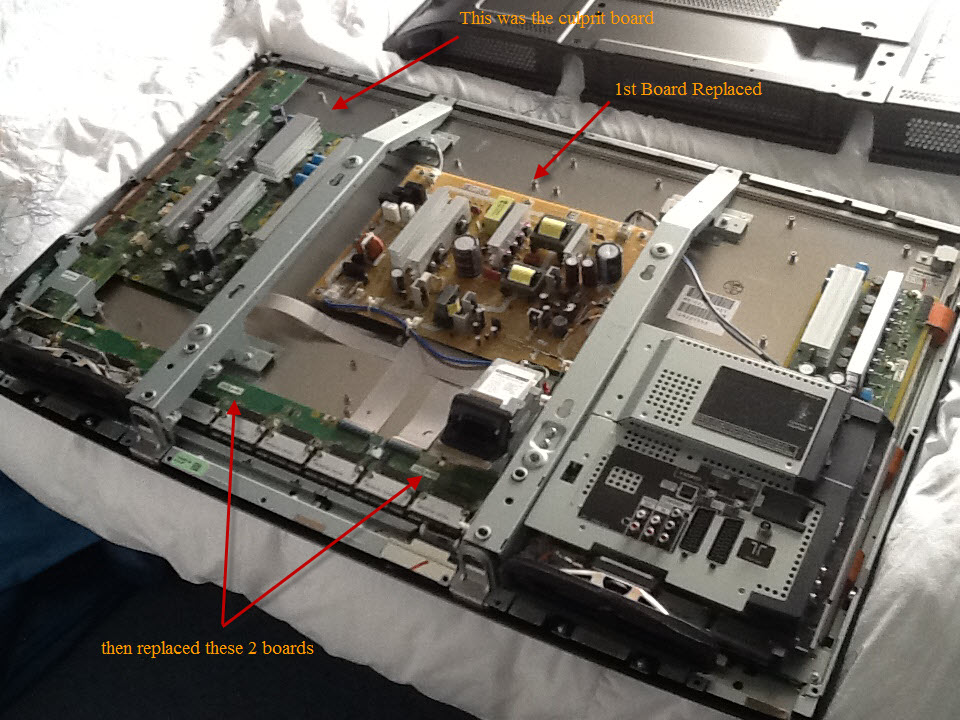
Step 1 - Replace the main power board in the centre of the telly, my assumption was that this is probably where a capacitor was likely to blow - once replace, I turned the TV on and... no change still 5 blinking lights.
Step 2 - Have another look at t'internet - found a technical manual for Panasonic Plasma TVs, but not my model, but there error code of 5 blinking lights directed you to either the main power board (already swapped out) or the PV5 connections, between the two boards at the bottom and the plasma screen - so I swapped both those boards out as well, one at a time, turning the TV on after each to make sure I had or had not fixed it. Still no luck.
I was starting to get a little disheartened by now, the above board replacements had taken me about two hours and I was starting to think the issue was beyond just swapping out boards...
Step 3 - One last board, I decided to swap out the circuit board to the left of the main power board (these all have very clever names like SSC etc. but it means nothing to me) - it just looked the next biggest with lots of capacitors - low and behold, once I had connected everything back up again, the TV switched on and I had a screen, albeit a screen with a thick white bar down the right hand side, but a working screen. The white bar was caused by one of the ribbon connectors not being seated properly when I switched out the boards in step 2.
So there you have it, if you have a 5 blink error on your Panasonic Plasma TX-P42S10B Viera Television, go to Bix Reclamation and see if they have a Dealer Repair Kit for it, and replace the big board to the left of the main power board 1st!
Knowing that TVs were a pain to fix, and usually not worth the cost, I went out and bought another TV, but the Panasonic was put up in the spare bedroom 'for later examination'.
I did a bit of research on t'internet, but trying to find what the 5 blink error code meant was nigh on impossible, I did find one posting that suggested it could be a board, then another YouTube video, where the guy suggested that it was probably a capacitor that had blown on one of the boards, these can be seen by the slightly bowed top to the capacitor, this sounded the most likely cause...
Well three months went by and I had a free Sunday, it was raining, so I decided to have the back off the telly and see if I could find a "popped' capacitor.
I used my spare bed as a workbench (I thought the duvet would protect the screen), and proceeded to remove the stand and multitude of screws holding the rear cover on. Surprisingly the rear cover was easy to remove, and I could finally see the 'gubbins' inside the telly.It had been a while since I had done my 'research', and I wanted to figure out which circuit board the 5 blink error code was originating from, blow me if I couldn't find the original article, but what I did find gave me some inspiration, I came across the website of Bix Reclamation and they had a 'Dealer Repair Kit' for my model of TV!
The Repair Kit was £70 so I decided to give it a go, as I was not sure I could see any capacitors blown on my boards (see picture below), I ordered it on the Sunday evening and it was delivered on the Tuesday, great service so far. The contents of the box contained all the circuit boards and controls inside the Panasonic Plasma, wrapped protectively up in bubble wrap, I was very impressed.
So last night, I grabbed my Phillips screwdriver, my glasses, a coffee and set about disemboweling the TV.
This is what I did...
Step 1 - Replace the main power board in the centre of the telly, my assumption was that this is probably where a capacitor was likely to blow - once replace, I turned the TV on and... no change still 5 blinking lights.
Step 2 - Have another look at t'internet - found a technical manual for Panasonic Plasma TVs, but not my model, but there error code of 5 blinking lights directed you to either the main power board (already swapped out) or the PV5 connections, between the two boards at the bottom and the plasma screen - so I swapped both those boards out as well, one at a time, turning the TV on after each to make sure I had or had not fixed it. Still no luck.
I was starting to get a little disheartened by now, the above board replacements had taken me about two hours and I was starting to think the issue was beyond just swapping out boards...
Step 3 - One last board, I decided to swap out the circuit board to the left of the main power board (these all have very clever names like SSC etc. but it means nothing to me) - it just looked the next biggest with lots of capacitors - low and behold, once I had connected everything back up again, the TV switched on and I had a screen, albeit a screen with a thick white bar down the right hand side, but a working screen. The white bar was caused by one of the ribbon connectors not being seated properly when I switched out the boards in step 2.
So there you have it, if you have a 5 blink error on your Panasonic Plasma TX-P42S10B Viera Television, go to Bix Reclamation and see if they have a Dealer Repair Kit for it, and replace the big board to the left of the main power board 1st!
Subscribe to:
Posts (Atom)